.svg)

Google AI answers
Better answers, right in Google.
Google lets you choose the sites its answers come from. Choose ClearPoint, and you’ll see ours first.
One click. Only changes what you see — undo it anytime.

See how ClearPoint Next’s advanced project management features unify planning and execution seamlessly.
- ClearPoint Next manages projects inside your strategy, so every initiative links to the objectives you are already tracking.
- The Project Management Dashboard is a control center showing proposed, active, and at-risk initiatives at a glance.
- AI suggests starter milestones that drop straight into project setup, turning a blank slate into a structured roadmap.
- Switch freely between Kanban and Gantt views, with dependency tracking and critical path highlighting surfacing cascading risk.
- Milestone completion rolls up automatically to the initiative level, and dashboards and reports shift the moment you update progress.
Strategy doesn’t deliver itself; people and processes do. Turning a plan into measurable progress depends on how well strategy and execution work together.
But all too often, strategy lives in one tool and projects live somewhere else. That disconnect leads to:
- Duplicate data entry
- Misalignment between top-level goals and day-to-day work
- Blind spots on dependencies or resource overload
With ClearPoint, you can avoid these issues — and simplify strategy execution dramatically — because your projects are incorporated into the strategy tool. So instead of keeping your strategy in ClearPoint and projects in X, you get both in one platform. No silos, no translation layers, no context lost.
The latest evolution of our software, called ClearPoint Next, has advanced project management features to help you bridge the gap between planning and delivery, cleanly and elegantly. Here’s what this means in practice and why it matters to your success.
Got 30 minutes? Book a demo and let us show you exactly how your strategy transforms into an actionable roadmap inside ClearPoint!
Project Management: What You’ll See (and Do) in ClearPoint Next
1. Your Portfolio At A Glance
ClearPoint’s Project Management Dashboard is your new control center. Status widgets show you how many initiatives are proposed vs. active vs. at risk. A glance here tells you where attention is needed across the portfolio.

2. Drill Into An Initiative
Click one initiative and you’ll see its strategic rationale, planned benefits, risk profile, and implementation plan. But this isn’t just documentation — it’s the input layer for execution. Everything you see here drives your milestones, resource plans, and progress tracking.
One nice touch: You can trigger AI assistance right from this page (e.g., generate milestone ideas), speeding setup.

3. AI-Powered Milestone Suggestions
Struggling to break a project into phases? Let ClearPoint’s AI suggest starter milestones that you can tweak. One click and you go from a blank slate to a structured roadmap.
Because the suggestions drop right into your project setup, you avoid the “draft in Excel → copy into ClearPoint” shuffle.

4. Move Between Kanban & Gantt
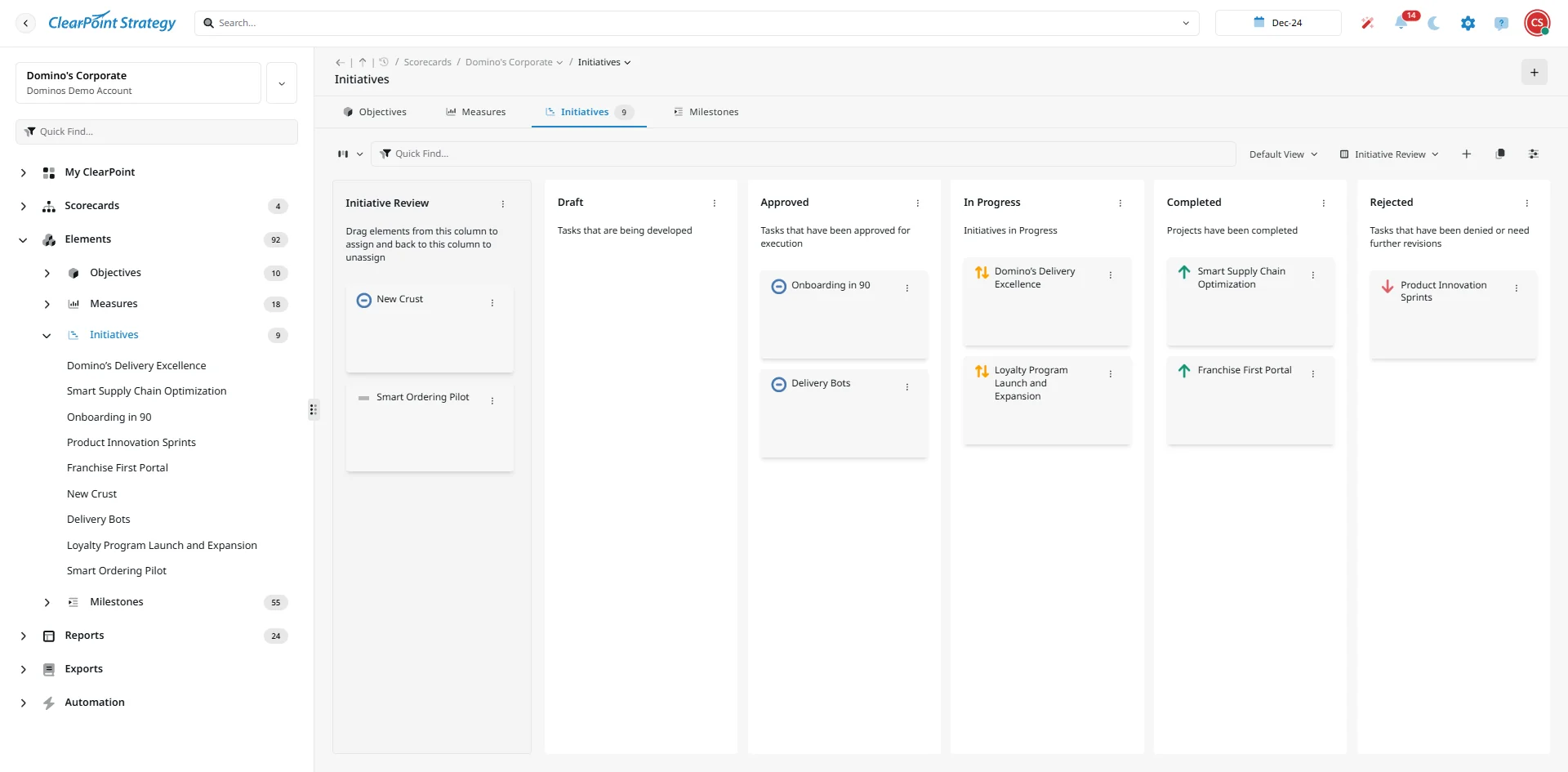
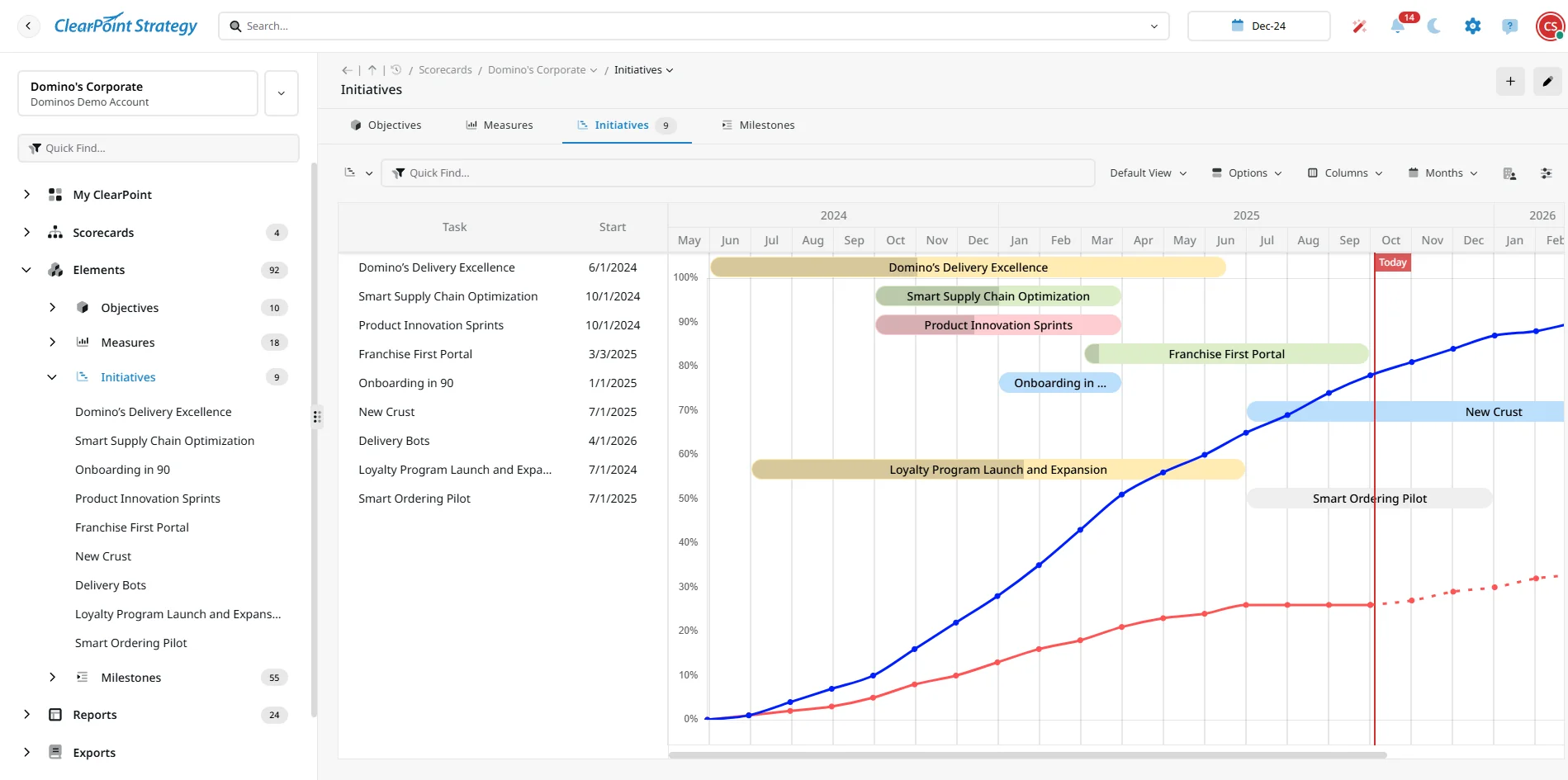
People think in different ways. Some see value in Kanban columns (To Do, In Progress, Blocked); others prefer a timeline view. In ClearPoint you get both:
- Kanban: Drag and drop your initiatives across stages.
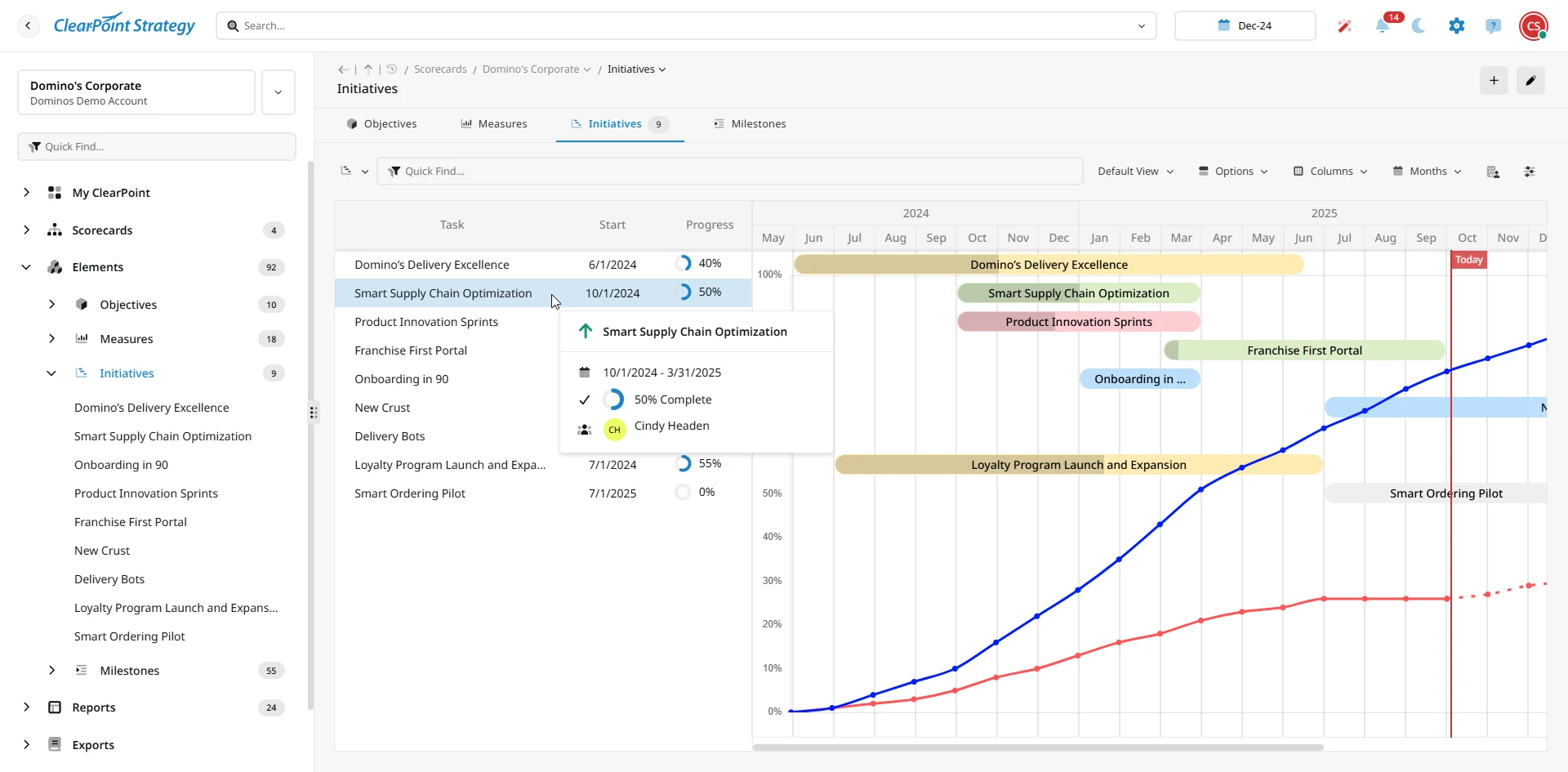
- Gantt: See a timeline, dependencies, overlaps, and resource timing.
- Dual-line bars: See planned vs. actual performance and spot slippages immediately.
Switching between views is frictionless. You see the same project, just from the perspective that addresses your immediate concern.
5. Dependency Logic & Smart Rollups
Project features don’t always follow a linear path. With dependency tracking and critical path highlighting, ClearPoint surfaces which delays trigger cascading risk.
Milestone percent completion rolls up automatically to the initiative level — no manual formulas or phantom “progress fields.” Everything stays consistent and trustworthy.
What You Get (Beyond Features)
Because projects now live inside your strategy, you unlock benefits you didn’t have before:
- Contextual alignment: Every project is linked to objectives you’re tracking. Every time you update progress, dashboards and reports shift automatically.
- Reduce friction: Use AI to scaffold your work. No more copying workflows across tools or wrestling with disparate systems.
- Insightful risk management: Dependencies and percent rollups help you flag issues before they become emergencies.
- Visibility everyone understands: Executives see what they expect (statuses, progress, alignment) while teams work in their preferred frame (Kanban, Gantt, tables).
- Better strategic accountability: Project work is no longer an afterthought — execution is baked into your strategy layer.
How to Roll This Out Smoothly
To successfully roll out this new way of managing projects and strategy together, follow these tips:
- Pick one initiative as a pilot. Apply AI milestone ideas, set dependencies, assign resources, and track progress.
- Train your project leads on the Kanban and Gantt views. Let them choose what fits their working style.
- Surface reports that show the delta. Compare before (using older tools/manual processes) vs. after in ClearPoint.
- Expand iteratively. Bring more projects in, integrate cross-team dependencies, and migrate away from standalone tools.
- Communicate alignment. Make it clear to leadership that execution is now embedded in strategy, not siloed off.
Start executing your strategy with confidence — and a greater degree of success! Book a demo of ClearPoint Next today.