.svg)
Google AI answers
Better answers, right in Google.
Google lets you choose the sites its answers come from. Choose ClearPoint, and you’ll see ours first.
One click. Only changes what you see — undo it anytime.

Give your organization an edge with an AI that knows your goals, connects your data, and helps you execute with confidence.
- ClearPoint Next AI is a context-aware co-pilot that knows your full plan: scorecards, objectives, measures, initiatives, milestones, and risks.
- It was built process-first, removing execution friction the team watched real strategy teams struggle with long before AI entered.
- It takes action straight from a prompt: updating initiatives and measures, adding objectives and milestones, and managing risks and action items.
- It runs semantic search and reporting across your whole account, surfacing slipping initiatives and drafting summaries on demand.
- Reach it wherever you work: inside the app, in Microsoft Teams, in Outlook, or by replying in plain English to a ClearPoint email.
- Upload your own documents to the AI Knowledge Base so answers come back from your context, with citations to the source.
Every strategy team knows the drill: You’re pulling performance data from multiple places, updating initiatives, chasing down narrative analysis, and preparing reports—often all at once. Just when everything feels aligned, a leader needs one more update, one more explanation, or one more analysis to make a decision.
That constant cycle isn’t a sign of poor process—it’s the reality of managing an ever-evolving strategy.
ClearPoint Next changes that dynamic.
With its advanced AI features, ClearPoint Next gives your team an always-on strategic partner that understands your full plan, anticipates your needs, and helps execute faster with less manual lift. It brings a new level of context-aware intelligence, built to support the real work of strategy.
Why We Built the New ClearPoint AI
ClearPoint has evolved significantly over the years based on feedback from our customer base.
In late 2025, we rolled out a modernized user interface and experience that we call ClearPoint Next. (We refer to the 2023–2025 version of ClearPoint as “ClearPoint Classic.”)
This new environment includes significant performance improvements and a streamlined workflow. But most importantly, it features a far more advanced, contextual, and capable AI assistant that can understand and support your entire strategic ecosystem.
ClearPoint Classic introduced AI as a helpful accelerator that was great for writing analysis, generating recommendations, and assisting with frameworks. But as teams adopted AI, we saw a bigger opportunity based on this realization:
Strategy execution isn’t a collection of one-off tasks. It’s a living, interconnected system. To truly help teams work smarter, AI needs full visibility into that system.
And to be genuinely effective, it also has to understand where that system tends to break down in the real world.
So ClearPoint built an AI experience with deeper awareness of your organization’s strategic ecosystem.
Think of it as a knowledgeable strategic coordinator—one that reads your scorecards, initiatives, risks, milestones, and reporting rhythm, and can act accordingly.
A simple way to describe this is “enhanced intelligence.”
ClearPoint AI responds to your commands with a full understanding of where your organization has been and where it wants to go—and is not limited by the information provided in the prompt you type. That means you get better, more informed answers, more relevant action suggestions, and smarter recommendations because it sees the bigger picture.
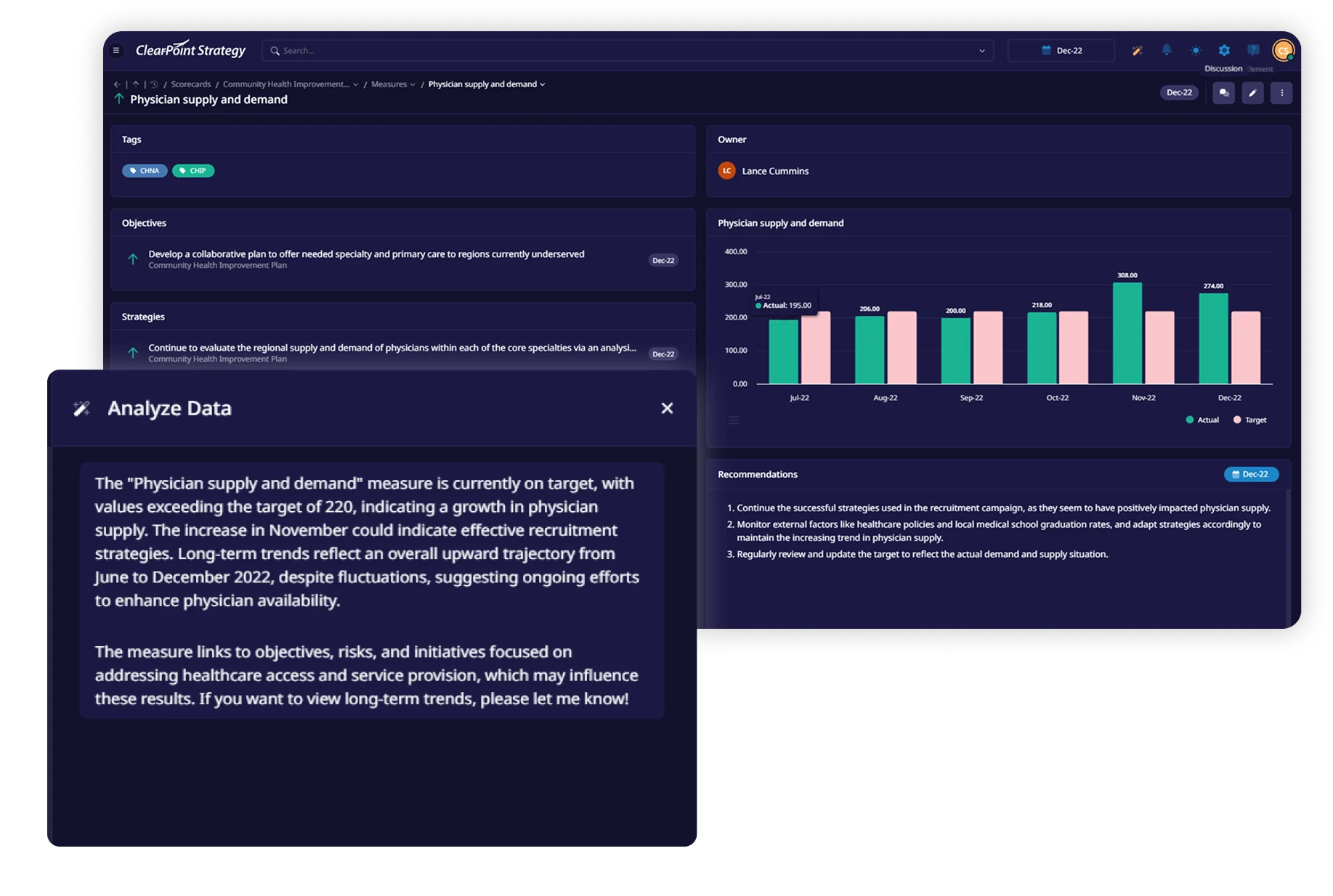
Strategy execution isn’t a collection of one-off tasks. It’s a living, interconnected system. To truly help teams work smarter, AI needs full visibility into that system.
Understanding the Process Before Applying AI
Long before AI ever entered the picture, ClearPoint was focused on one thing: removing friction from the strategy execution process.
Every feature started with watching real teams struggle—trying to track initiative dependencies, coordinate reporting across time zones, and keep executives informed without burying them in data.
Over the past twenty-five years, we’ve listened to thousands of teams describe where execution breaks down and refined ClearPoint through just as many iterations. That history matters, because ClearPoint Next is the product of decades spent understanding the exact points where strategy work slows down.
When we added AI, we placed it where it counts: right at those friction points.
The difference with ClearPoint Next is that its AI understands the strategy process itself.
It knows, for example:
<p style="padding-left: 30px;">👉Which status changes trigger stakeholder updates</p>
<p style="padding-left: 30px;">👉Which performance patterns signal emerging risks</p>
<p style="padding-left: 30px;">👉Why certain measures carry more weight during critical cycles like budgeting or quarterly reviews</p>
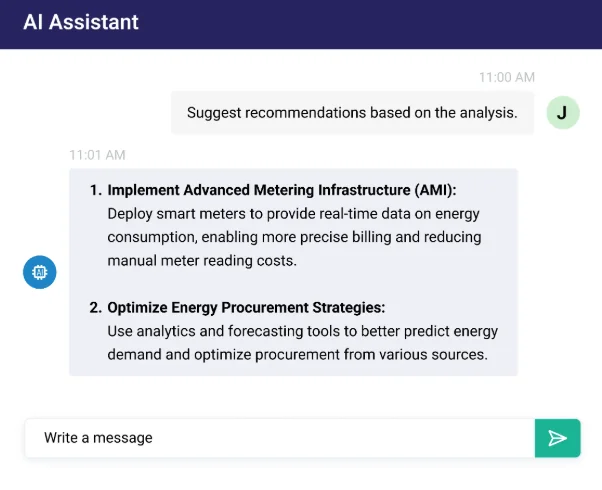
This is AI shaped by strategy experts and backed by living human expertise.
When you ask ClearPoint Next a question, you’re getting strategy execution guidance that used to require scheduling time with a consultant or hoping your most experienced team member was available—now available on demand.
ClearPoint Next has full visibility into your strategic architecture—every scorecard, objective, measure, initiative, milestone, action item, and risk—and it understands how those pieces connect. It knows your reporting cycles and can recognize patterns across your organization that would take a human analyst hours to piece together, helping your team move from reactive updates to proactive, confident execution.
What You’ll See (and Use) In ClearPoint Next
All of that history and embedded expertise shows up in how the AI actually behaves inside ClearPoint Next.
Below is an overview of the major capabilities in the new ClearPoint AI, paired with the “why” behind each, so you can see exactly how it reduces friction in your day-to-day strategic work.
Powerful Playbooks for Any Framework
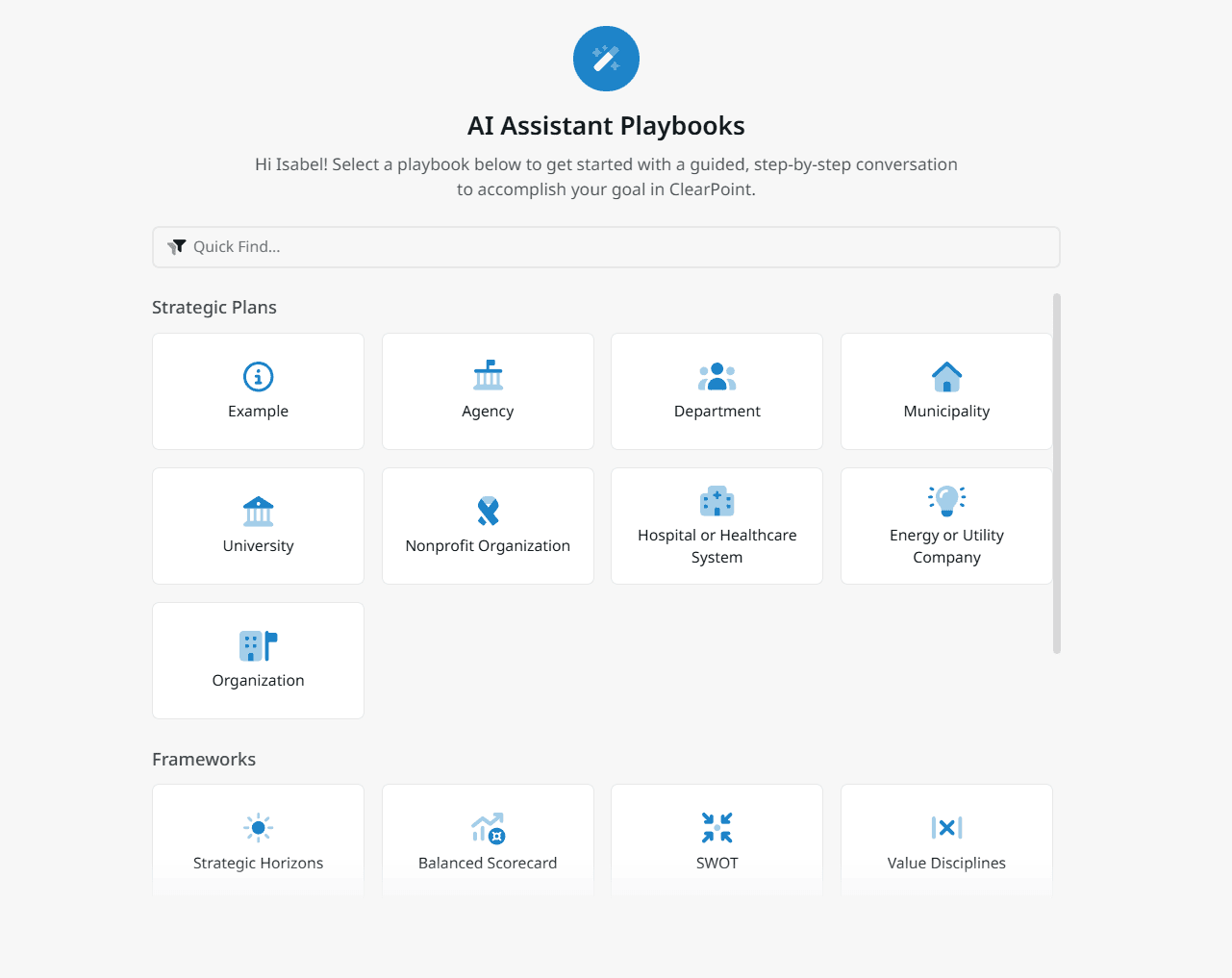
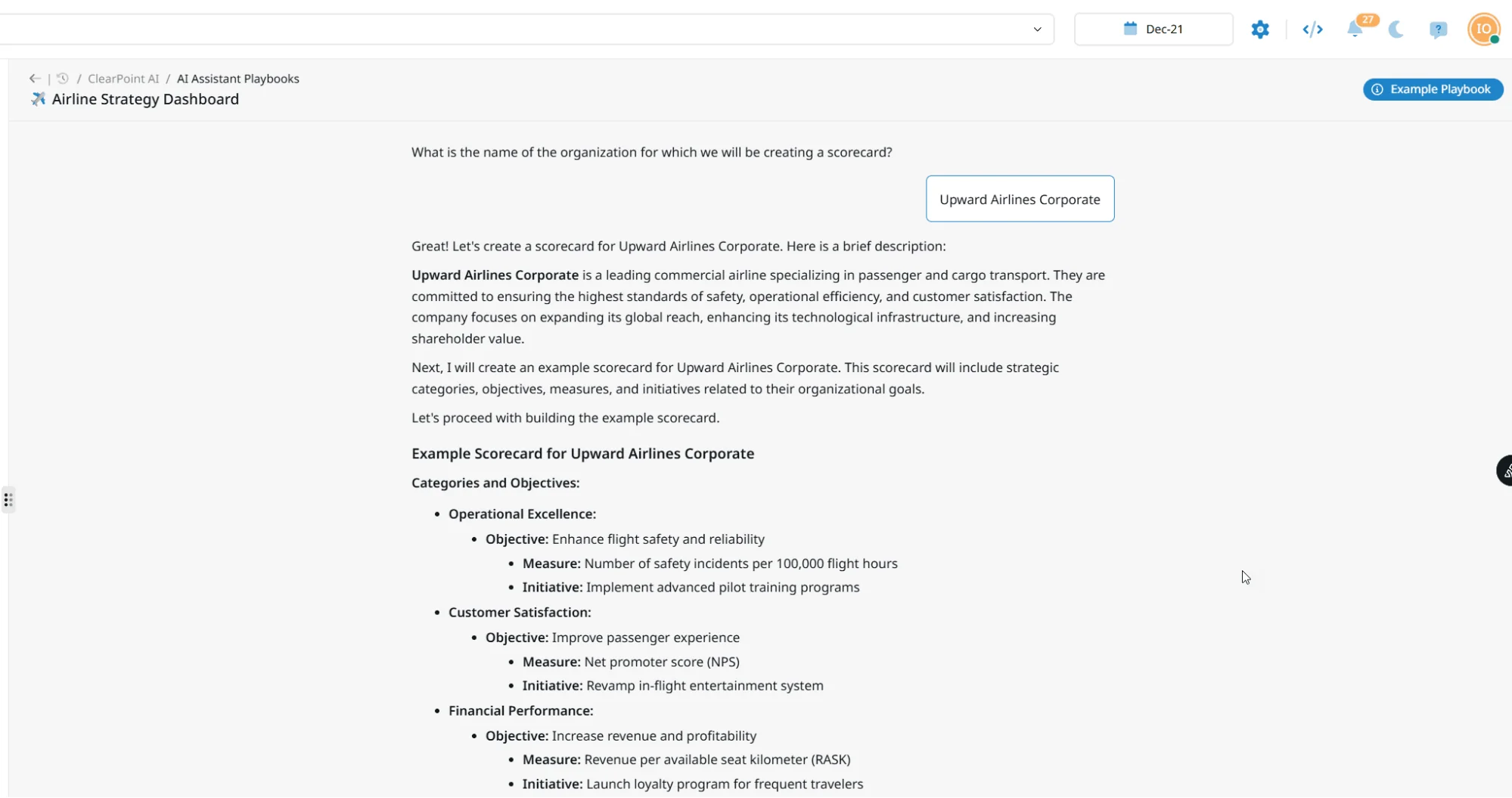
Playbooks are guided, multi-step workflows for real strategy work—SWOT analyses, risk assessments, account rollovers, OKR builds, onboarding a new department, or standing up an enterprise plan. They walk users step-by-step through building scorecards, objectives, or entire plans.
The new AI enhances these with more flexibility, richer examples, and the ability to adapt to nearly any strategic framework—from Balanced Scorecard to OKRs to custom methodologies. Type “create a scorecard” and the right playbook opens automatically.
Custom playbooks are available in beta: our team builds them with you, drawing on your own knowledge base and matching your terminology.
Why you’ll love it:
Consistency across departments will become effortless. New users can contribute confidently, and experienced teams get a repeatable process that scales.
A Strategy Assistant That Knows Your Whole Plan
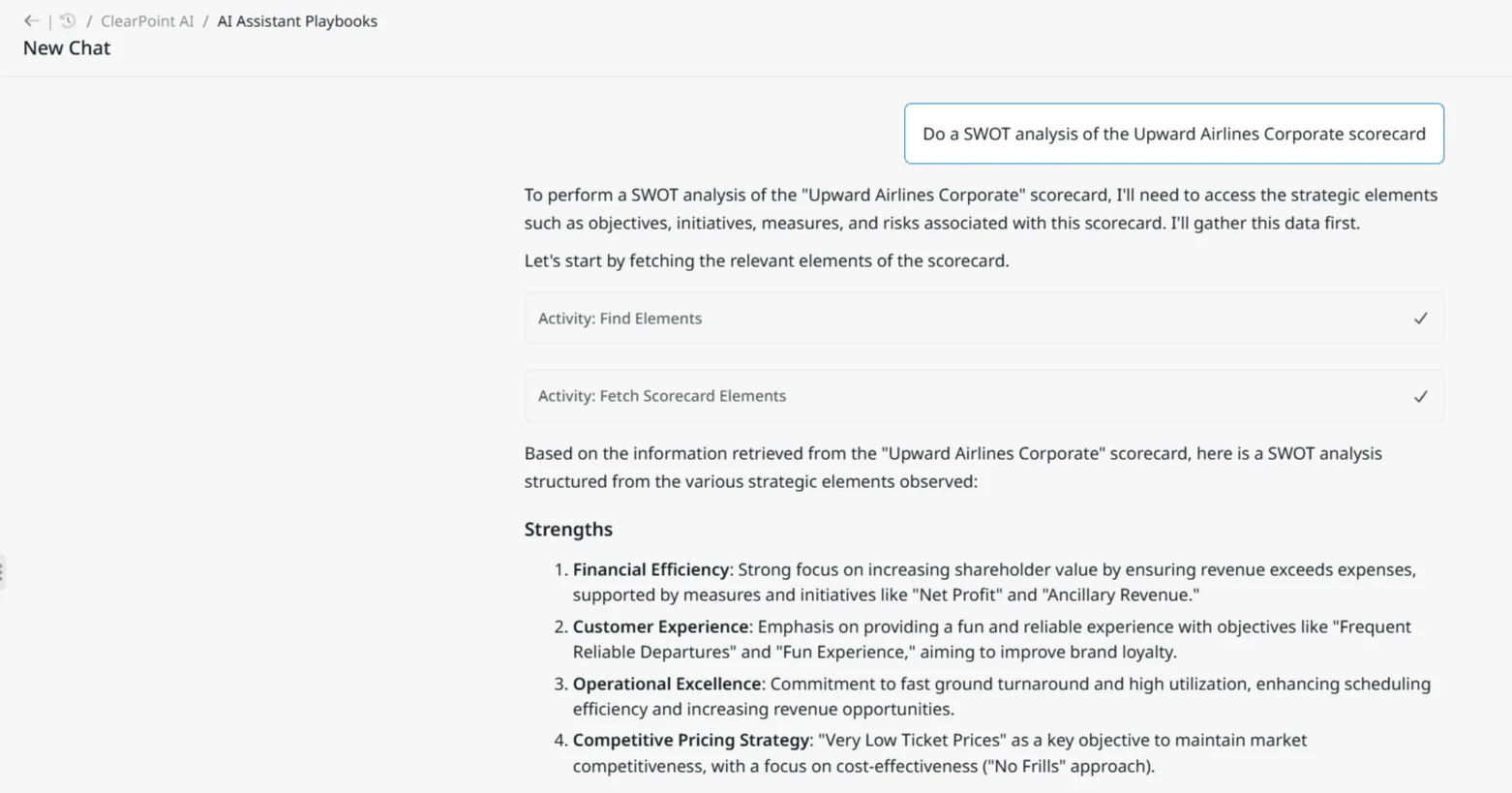
ClearPoint AI can access and analyze everything that powers your strategy:
- Scorecards
- Objectives
- Measures
- Initiatives
- Milestones
- Action items
- Risks
Ask it to summarize performance, diagnose what’s off track, or recommend next steps—and it will answer using your actual data and structure. Objective analysis now reads each linked measure’s status, analysis, owner and recommendations, and scorecard analysis reads the full element roster, so the output reflects what is actually happening in your plan.
Why you’ll love it:
You’ll get back the many hours it takes to manually gather information for answering basic questions. ClearPoint AI does that work instantly—grounded in your real strategy.
Take Action Straight From the Conversation
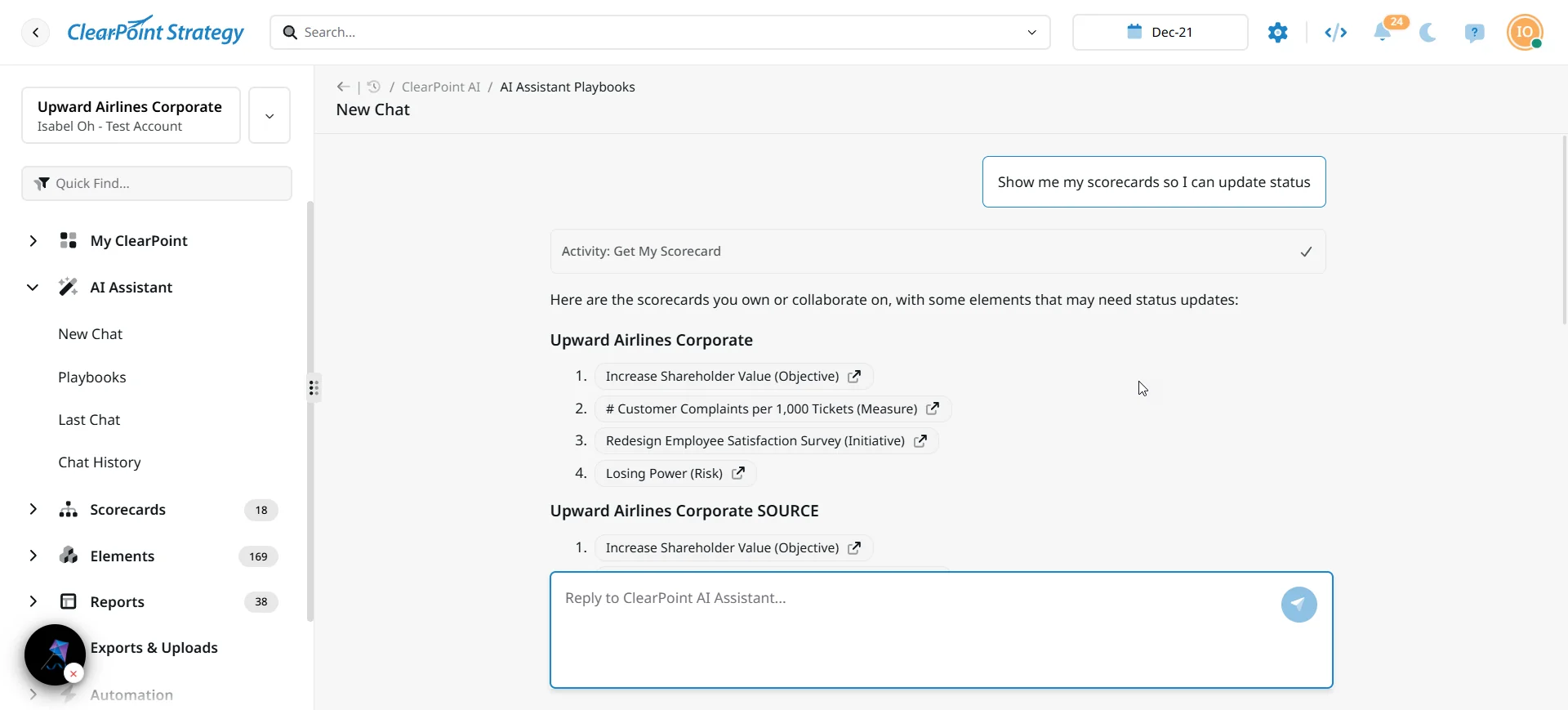
ClearPoint AI can take immediate action from simple prompts. It can:
- Update initiatives or measures
- Add objectives, initiatives, or milestones
- Manage risks and action items
- Retrieve statuses and make recommendations
And when it recommends something, you can turn that recommendation into an action item or milestone with the right status, type and owner already set.
Why you’ll love it:
Instead of bouncing between pages, you can make updates conversationally. The small tasks won’t ever slow you down again!
Search, Reporting & Insights Across Your Whole Account
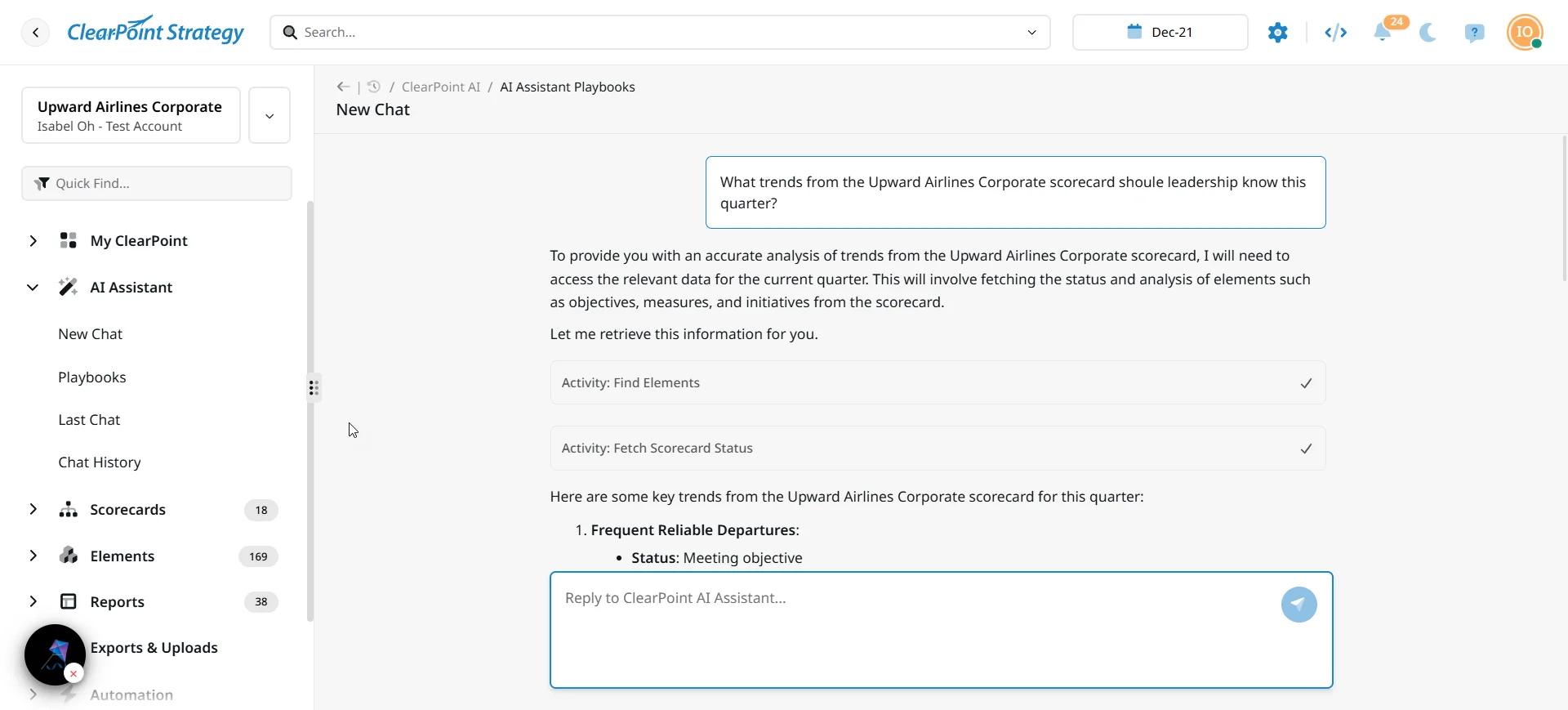
ClearPoint AI performs semantic search across your strategy and can generate summaries, highlight issues, or draft reports. You can ask the AI:
- “Which initiatives are slipping behind schedule?”
- “Show me risks associated with our customer growth objective.”
- “What trends should leadership know this quarter?”
It also produces scorecard summaries, exception reports that surface only what is off track, and briefing books generated straight from the preview rail.
Why you’ll love it:
Leaders get clearer visibility, and analysts get hours back each month!
Ground ClearPoint AI in Your Own Documents
One of the most powerful features of ClearPoint Next AI is its ability to ingest and use documents as context. Upload your strategic plan, a board paper, a policy document or a performance report to the AI Knowledge Base, and the AI will reference it in future answers—citing the source it drew from.
Before you roll it out, you can review everything that is connected and test the AI’s answers against your knowledge base in a dedicated testing chat. AI Memories keep each user’s role, goals and preferences in view, and administrators control what the AI remembers, per user.
Why you’ll love it:
Your AI will become a trusted partner that understands both your strategy and the supporting materials behind it.
Update Your Scorecard Without Opening ClearPoint
This is the capability that changes adoption. Reply in plain English to any ClearPoint email carrying a PDF export—a briefing book, a page report—and ClearPoint AI reads the attachment and returns insights and recommendations, or writes the updates straight back into the scorecard. No login required.
You can reach the same AI from the tools your team already lives in:
- Microsoft Teams. ClearBot in Teams matches the full in-app AI experience—data-aware and calendar-aware—so people ask about their strategy and get real answers without leaving the channel, plus proactive AI notifications. Administrators configure it centrally.
- Outlook. Each user connects their own Outlook from My Apps. The AI becomes calendar-aware—“what’s my next meeting?”—and can draft and send email on their behalf, including meeting follow-ups.
- Connected Apps. Administrators centrally manage which integrations are enabled across the organization.
Why you’ll love it:
The executives who will never log in are the ones whose input you need most. Now they can give it from their inbox.
Bring Your Own AI Assistant
The ClearPoint MCP Server lets you connect Claude, Cursor or Copilot straight to your own ClearPoint data over a secure, OAuth-authenticated connection. You’ll find it in Settings › Integrations, with a copyable server URL and configuration.
Once connected, your assistant of choice can read your strategy, ask questions of it, and write updates back—working with your real scorecards, objectives, measures and initiatives rather than a copy.
Why you’ll love it:
Your team already has an AI assistant it trusts. This connects that assistant to the plan, instead of asking anyone to switch tools.
A Homepage That Briefs You
My AI Briefing is a role-aware AI homepage that rebuilds from live account data every time you open it—and it shows a genuinely different page to an administrator, a leader and a contributor. It brings together:
- Recent Updates — an AI summary of the last 20 days of activity, with severity-rated flags on what matters
- Strategy Brief — an executive summary with a prioritized Recommended Focus
- Key Signals — mini trend charts, each with an AI interpretation of what the trend means
- Questions Worth Asking — discussion questions for your next leadership meeting
- My Checklist — the items needing updates, prioritized, with plain-language instructions on what to do
- Adoption & ROI — value signals and adoption opportunities for the account
Contributors edit directly from the briefing, updating elements without navigating away from the homepage.
Why you’ll love it:
Everyone opens the same product and lands on the page that matches their job.
Set Your AI Preferences (Tone, Length, Style)
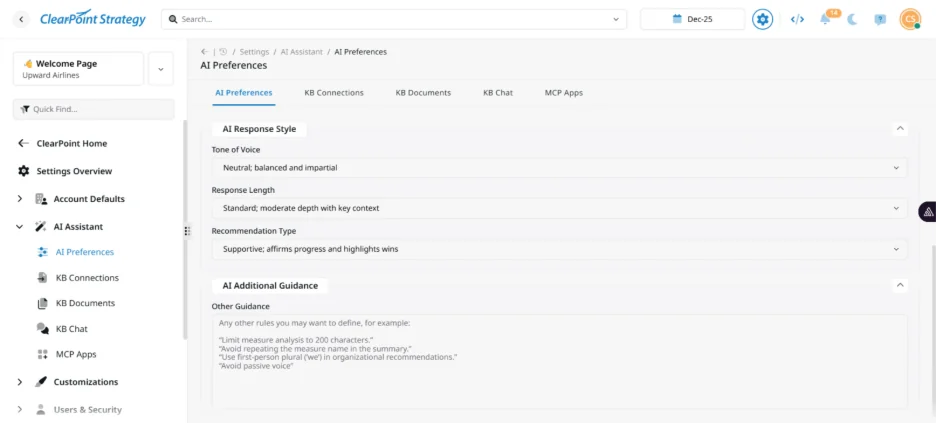
Every organization communicates differently; you can configure ClearPoint AI to match your style. It can be tuned to:
- Write concisely or with narrative depth
- Use a professional, friendly, or analytical tone
- Return recommendations that are supportive or challenging
- Format responses for reports, leadership, or team updates
You can also write free-text custom guidelines the AI follows across the account.
Why you’ll love it:
Consistency builds trust—especially in executive reporting.
AI Your Administrators Control
For organizations in the public sector, healthcare, education and other regulated environments, governance is a purchase requirement. ClearPoint AI is built to be governed:
- AI preferences live in System Setup, not in individual user profiles, so behavior is consistent across the account
- One toggle hides every AI feature account-wide
- Administrators can review AI chat transcripts across users, with a named audit trail
- AI answers and suggestions honor each user’s existing access rights, and say so clearly when they cannot surface something
- The AI states when a request is outside its capabilities rather than reporting false success
- A formal AI Subprocessor Agreement covers AI data processing
Why you’ll love it:
The conversation with your IT and procurement teams gets a great deal shorter.
What You Get (Beyond Features)
ClearPoint AI is designed to strengthen your entire strategy practice by providing:
- Clear accountability through more timely updates
- Better alignment because teams understand what’s happening and why
- Earlier risk visibility thanks to always-on analysis
- Faster execution with friction removed from everyday strategic work
- More confident reporting grounded in accurate, contextual insights
And because it’s built within ClearPoint Next, every capability is designed to grow with you.
<div class="index-cards"><div class="index-card"><div class="index-card-title"></div><div class="index-card-content"><h3><strong><img src="https://cdn.prod.website-files.com/637e14518f6e3b2a5c392294/6967ce069c3c00b7546d51dc_clearpoint-next-ai-clock-icon.webp" alt="Clearpoint Next AI - clock icon" width="100" height="94" align="right" />Another major benefit: Reclaimed time!</strong></h3><p><strong>Time that was spent chasing updates, compiling reports, and answering repetitive questions about status goes back to your team.</strong></p><p>That time can instead be spent on strategic thinking—and the conversations that actually move organizations forward.</p></div><div></div>
ClearPoint AI: Strategy Execution, Accelerated
ClearPoint Next AI isn’t about replacing human judgment. It’s about removing the friction that slows strategy teams down.
By giving your organization a smart, context-aware assistant, you empower people to focus on what matters: alignment, decision-making, and meaningful progress.
As a result, execution becomes embedded in your strategy—and your strategy becomes far easier to execute.
ClearPoint’s AI features are fully optional. You can turn certain features on when your organization is ready, expand AI’s capabilities over time, and leverage ongoing enhancements (see the latest in our ClearPoint Release Notes).
If your team has security or data-processing questions about ClearPoint AI, our support team can walk you through the AI Subprocessor Agreement and how AI handles your account data.