We analyzed over 20,000 strategic plans. Get a copy of the full report.
Free tool ·
All
Objective, current, target, owner, due date. Gap, gap type and priority calculate as you type. Start from ten example gaps or paste yours. Free to use; email only to export.
Free to use. No account. Email only to export.
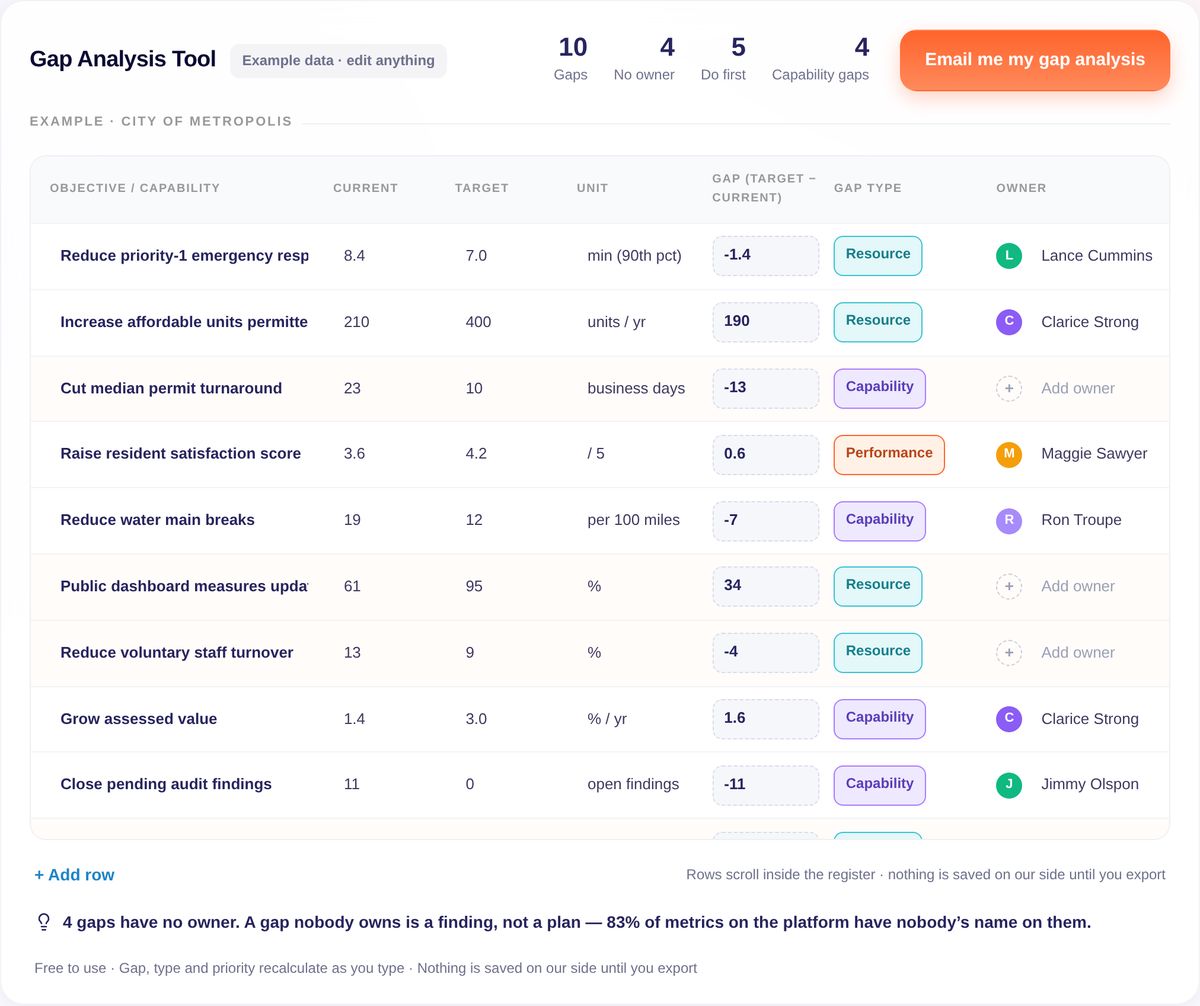
Example gap analysis — City of Metropolis (illustrative). Ten objectives with a current value, a target and a due date; four still without an owner. In the tool, gap, gap type and priority are calculated from these columns.
| Objective | Current | Target | Unit | Owner | Due |
|---|---|---|---|---|---|
| Reduce priority-1 emergency response time | 8.4 | 7.0 | min (90th pct) | Lance Cummins | 2026-12-31 |
| Increase affordable units permitted | 210 | 400 | units / yr | Clarice Strong | 2027-06-30 |
| Cut median permit turnaround | 23 | 10 | business days | — | 2027-06-30 |
| Raise resident satisfaction score | 3.6 | 4.2 | / 5 | Maggie Sawyer | 2027-03-31 |
| Reduce water main breaks | 19 | 12 | per 100 miles | Ron Troupe | 2027-09-30 |
| Public dashboard measures updated on time | 61 | 95 | % | — | 2026-12-31 |
| Reduce voluntary staff turnover | 13 | 9 | % | — | 2027-06-30 |
| Grow assessed value | 1.4 | 3.0 | % / yr | Clarice Strong | 2027-09-30 |
| Close pending audit findings | 11 | 0 | open findings | Jimmy Olspon | 2026-10-31 |
| Increase recycling diversion rate | 24 | 35 | % | — | 2028-06-30 |
Priority: Do first when the gap is 30%+ and due within a year (or already past due); Do next when 30%+ and further out; Monitor otherwise.
Reuse freely with attribution. Canonical source: https://www.clearpointstrategy.com/free-tools/gap-analysis
| Objective / capability | Current | Target | Unit | Gap (target − current) (calculated) | Gap type (calculated) | Owner | Due | Priority (calculated) |
|---|---|---|---|---|---|---|---|---|
|  |  |  |  |  |  |  |  |  |
|  |  |  |  |  |  |  |  |  |
|  |  |  |  |  |  |  |  |  |
Source: ClearPoint Strategy — https://www.clearpointstrategy.com/free-tools/gap-analysisWe’ll email a CSV of your gaps — current, target, gap, type, owner, due, priority — and a printable one-page summary. After that, occasional examples from teams doing this work. Unsubscribe in one click.
Nothing is saved on our side until you export.
On its way to your inbox
A gap analysis is a Monday-morning document: it is only useful if someone is asked, by name, what they will do about each line. In a 30-minute session we show how a plan like yours turns each gap into an owned objective with a measure that gets updated — on your data, not ours.
2.5×
completion rate when an initiative has a named owner · 21.5% vs. 8.7%
61.9%
of named owners never wrote a status update · n = 55,222
9.2 months
median strategic project — the horizon a gap plan should fit · n = 114,927
~13×
as often, measures teams keep re-checking recover vs. ones left alone after a look or two · ClearPoint platform data
ClearPoint platform data · January 2026 snapshot
A gap analysis template is a table that compares the current value and the target for each objective and sizes the difference. A usable one also types the gap — capability, resource, performance or timing — and puts an owner and a due date on it. This tool does the sizing and typing for you; you supply the names. On the ClearPoint platform, initiatives with a named owner complete at 2.5× the rate (21.5% vs. 8.7%, January 2026).
Case studies
Published ClearPoint customer stories, matched to this tool.
Public health · six divisions, 50 staff
Division plans written in late 2019 never launched after COVID-19. Each division kept its own Excel files, with no shared place to review data across the department.
The department adopted ClearPoint and named a Performance Management Champion in every division, who presents dashboards at leadership meetings and shares HTML exports with staff.
Six divisions in one shared view
Trends that were split across divisions are now visible together, and the department plans to bring its Community Health Improvement Plan into the platform.
Read the Winnebago County story →
Local government · 50,000 residents
Each department built its own PowerPoint, so reporting was inconsistent and the same data was read in different ways. The City Manager kept asking, "How are we winning?"
From 2020, the performance analytics team built a framework around sustainability, connectedness and resilience, coached departments to write concise measures and linked each measure to a strategic goal.
One source of truth for leadership
Automated data collection replaced manual gathering from many sources, and a public community dashboard is the next step.
Why gap analyses end up in a drawer
A gap analysis template compares where you are and where you need to be on each objective, with the difference sized, typed and given an owner and a date. The template is the easy part. The hard part is the column most templates leave out: whose name is on the gap.
Because the gap gets sized and nobody gets assigned. On the ClearPoint platform, initiatives with a named owner complete at 2.5× the rate (21.5% vs. 8.7%), and ClearPoint shows which metrics still need an owner and which owners haven't updated yet (January 2026). A gap with no owner is a finding. A gap with an owner and a due date is a plan.
A gap with no owner is a finding. A gap with an owner and a due date is a plan.
A template (Excel, Miro, Confluence) gives you the columns; this tool fills them for you — gap, gap type and priority recalculate as you type — and will not export until you have looked at who owns what.
| Gap analysis template | This tool | |
|---|---|---|
| Gap = target − current | You type it | Calculated |
| Gap type (capability / resource / performance / timing) | You decide | Assigned from size and due date |
| Priority | You decide | Do first / Do next / Monitor, recalculated |
| Owner on each gap | Optional | Counted; flagged |
| Export | Download the file | CSV + one-page summary |
| Email required | To download | Only to export |
Plan within the horizon you can measure: the median strategic project on the platform runs 9.2 months (n = 114,927). A gap due in three years with no milestone before then is a wish. The tool marks gaps due within a year as Do first when they are 30% or more of target.
Customer stories on this page
Winnebago County Public Health · City of Dublin, Ohio
Yes. Add your objectives, current values and targets in the browser without an account. Email is asked only when you export.
A gap analysis compares where you are (current) with where you need to be (target) on each objective, sizes the difference, and decides what kind of gap it is — capability, resource, performance or timing — so the right response follows.
Capability (you cannot do it yet), resource (you can, but not at this scale), performance (you can, but execution lags) and timing (the deadline has passed). The tool assigns one from the size of the gap and the due date.
Do first when the gap is 30% or more of target and due within a year or already past due; Do next when 30% or more but further out; Monitor otherwise. Change a target or a date and the priority changes.
A CSV of every gap with current, target, gap, type, owner, due date and priority, and a printable one-page summary with your counts.
ClearPoint platform data, January 2026 snapshot: 327,582 metrics (ownership), 114,927 projects (duration), 55,222 owned metrics (owner activity).
Method
Relative gap = |target − current| ÷ |target|. Timing if the due date has passed; Capability at ≥ 50%; Resource at 20–50%; Performance under 20%. Priority: Do first at ≥ 30% and due within 365 days (or past due); Do next at ≥ 30% otherwise; Monitor below 30%. These thresholds are practice judgments from ClearPoint’s strategy team, not measured optima — change a target and watch them move.
Ownership: completion of initiatives with a named owner vs. without (21.5% vs. 8.7%). Owner activity: 55,222 owned metrics, written updates only. Duration: n = 114,927 projects with start and end dates. Status records: 10,046,276, keyword flag — a floor.

.svg)
