Ten platforms compared on dated G2 data, public pricing, free trials and sector focus, with the trade-off each vendor's own reviewers cite most.
- Test ownership before features. Across 52,247 objectives in 318 organizations, 77% have no named owner, and initiatives with a named owner are completed 2.5× as often (21.5% vs 8.7%), in ClearPoint anonymized platform data, 2017–2024.
- Read review volume before the score. Eight of the ten G2 ratings sit between 4.4 and 4.8; a 4.8 on 4 reviews and a 4.6 on 180 are different evidence (G2, November 16, 2026).
- Only one of ten vendors publishes a price. OnStrategy lists $200 a month for its self-guided plan; the other nine quote after a call.
- Three of ten state a free option. Cascade, OnStrategy and Intrafocus; the rest start with a demo, so build your own report in it.
- Test the monthly update before the dashboard. Give a department head one measure to update with no training, and ask what leadership sees if they skip it.
Choosing strategic planning software is the easy part to get wrong quietly. Every platform below demos well. The difference shows up in month four, when the first quarterly report is due and somebody has to own every objective. So we compared ten platforms on things you can check yourself in five minutes: G2 rating and review volume, whether the price is public, whether there is a free trial, and which sectors each vendor actually builds for.
A disclosure before the table: we make ClearPoint Strategy, one of the ten. That is why every number below comes with a date and a source you can open, and why each vendor gets its strengths and its trade-offs, ClearPoint included.
One more thing we can add that a review site cannot: data on how plans behave once they are inside a platform. We analyzed over 20,000 strategic plans run on ClearPoint between 2017 and 2024, and the clearest pattern is ownership: initiatives with a named owner are completed 2.5× as often (21.5% vs 8.7%). That is the test we use at the end of this guide.
What is the best strategic planning software in 2026?
For organizations that report a plan to a board, a council or a regulator (cities, counties, health systems, universities), ClearPoint Strategy fits best: as of November 16, 2026, it is the only platform here that combines a G2 rating of 4.5 or more on 100+ reviews, a stated focus on government, healthcare and higher education, and a SOC 2 Type II report stated on its public site. For other jobs, the answer changes. Cascade and WorkBoard (which now includes Quantive) lead on G2 volume for corporate strategy teams. AchieveIt, Envisio and OpenGov are built for the public sector. OnStrategy and Rhythm Systems pair software with coaching for mid-sized companies. Planview serves enterprise portfolio offices. Intrafocus resells Spider Impact with KPI consulting in Europe.
| Platform | G2 rating (reviews) | Public price? | Free trial? | Sector focus stated by the vendor | SOC 2 Type II on public site? | Best for |
|---|---|---|---|---|---|---|
| ClearPoint Strategy | 4.6 (180) | No, quote after a short call | No, guided tour and demo | Government, healthcare, higher education | Yes | Board and council reporting on a plan |
| WorkBoard (incl. Quantive) | 4.6 (308) | No | No, demo | Large enterprises | Not stated, ask | Enterprise OKRs and strategy-to-investment links |
| Cascade | 4.8 (260) | No | Free plan, 2 users | Corporate strategy teams | Not stated, ask | Self-serve strategy execution |
| AchieveIt | 4.4 (199) | No | No, demo | State and local government, healthcare, higher education | Not stated, ask | Rolling up many plans at once |
| Envisio | 4.7 (16) | No | No, demo | Public sector only | Not stated, ask | Public-facing plan dashboards |
| OpenGov Budgeting & Performance | 4.4 (5) | No | No, demo | State and local government | Not stated, ask | Budget books, with performance as a module |
| Intrafocus (Spider Impact) | 5.0 (1) | No | Yes, 30 days on request | Finance, energy, utilities, professional services | Yes (Spider Strategies) | KPI scorecards with consulting, EMEA |
| Rhythm Systems | 4.4 (429) | No | No, free assessment | Mid-market companies | Not stated, ask | Quarterly priorities with executive coaching |
| Planview | 3.8 (90, Planview Portfolios) | No | Ask, demos and trials page | Large enterprise PMOs | Not stated, ask | Strategic portfolio management |
| OnStrategy | 4.8 (4) | Yes, $200 a month, self-guided plan | Yes | Mid-sized organizations | Not stated, ask | A first strategic plan with a coach |
G2 ratings and review counts read on G2’s strategic planning and execution category on November 16, 2026. Price, trial, sector and SOC 2 columns read on each vendor’s own pricing, trial and about pages the same day. “Not stated, ask” means the vendor’s public pages we read don’t say it, not that the vendor lacks it. Quantive’s own G2 listing now shows no reviews; its reviews sit under WorkBoard.
Look at the second column before the first. A 4.8 built on 4 reviews and a 4.6 built on 180 are different kinds of evidence. Eight of the ten ratings sit between 4.4 and 4.8, so the scores will not make this decision for you. The fit will.
What is strategic planning software?
Strategic planning software is a system that holds an organization’s plan (goals, objectives, measures and the projects behind them) in one place, assigns an owner to each piece, collects updates on a schedule and turns them into reports for leaders, boards or councils. It differs from project management software, which tracks tasks, and from budgeting software, which tracks dollars. Its job is to keep a plan owned, current and visible after the kickoff.
How we ranked these ten platforms
We wrote this guide for one reader: an organization that has to report progress on a strategic plan to a governing body. For that reader, three criteria are checkable from the outside, and we ordered the table by how many each platform meets, then by G2 review volume:
- Evidence: a G2 rating of 4.5 or more, built on at least 100 reviews.
- Sector focus: government, healthcare or higher education named as a focus on the vendor’s own site.
- Security: a SOC 2 Type II report stated on the vendor’s public site.
ClearPoint meets all three. WorkBoard and Cascade meet the evidence test. AchieveIt, Envisio and OpenGov meet the sector test. Spider Impact, which Intrafocus resells, meets the security test. Rhythm Systems, Planview and OnStrategy meet none of the three as we defined them, which says more about our reader than about their products: they are built for other buyers, and the profiles below say which.
What most comparisons skip
Many comparison pages in this category are published by a software vendor that ranks its own product first, and few say when their G2 or Capterra ratings were read. That makes them hard to check.
Our rule for this page: the method above, a date on every rating, and a link to the source behind each vendor fact we state.
The ten platforms, one by one
1. ClearPoint Strategy: best for organizations that report to boards and councils
ClearPoint links goals, measures and projects, assigns an owner to each, and assembles the recurring board or council report from live data. 200+ organizations run their plans on it, including 120+ local governments. At Southern Ohio Medical Center, populating performance data used to take one person 40 hours a month; in ClearPoint it takes 15–20 minutes. On G2 it holds 4.6 across 180 reviews; G2’s review summary describes support as responsive and knowledgeable, and notes that training and complex administration can take extra effort. That is why setup is done with you: a named account manager, a first live scorecard in 3 weeks, and SOC 2 Type II security for the procurement checklist. There is no public price and no free trial; pricing is a quote after a short call. If you want a tool you configure alone this weekend, look at Cascade or OnStrategy.
2. WorkBoard (including Quantive): best for enterprise OKR programs
WorkBoard acquired Quantive in May 2025, and Quantive customers are moving onto the WorkBoard platform. WorkBoard holds 4.6 across 308 G2 reviews and serves large enterprises that run OKRs across many teams and want to connect strategy to investment decisions. Pricing is by demo and quote. If you run Quantive today, ask about migration timing, feature parity and contract terms before your renewal date; our Quantive migration guide lays out the options if you would rather move once.
3. Cascade: best self-serve platform for corporate strategy teams
Cascade holds 4.8 across 260 G2 reviews, the highest rating on a large review base in this comparison. It is fast to start, with a free plan for two users, and comfortable with OKRs and AI-assisted dashboards. Paid plans are priced on request. For a commercial team that wants a working plan without a services engagement, it is a strong option, and we say that as a competitor.
4. AchieveIt: best for rolling up many plans at once
AchieveIt serves state and local government, health departments, healthcare and higher education, and is built for visibility across many concurrent plans, with reminders that keep updates coming in. It holds 4.4 across 199 G2 reviews. AchieveIt’s pricing page says it does not offer a standard free trial, and that all plans include a 20-user minimum. See ClearPoint vs. AchieveIt for a side-by-side.
5. Envisio: best for public-facing plan dashboards
Envisio serves the public sector only (local government, education, healthcare and nonprofits) and is known for dashboards that show residents how a plan is doing. It holds 4.7 on G2 across 16 reviews, a small base. Pricing is quote-based, with no free trial. If transparency dashboards are your first goal, shortlist it; if internal decision reports are the job, rebuild one of yours in the demo. Our ClearPoint vs. Envisio comparison covers the differences and other alternatives.
6. OpenGov Budgeting & Performance: best when the budget book is the real project
OpenGov serves state and local governments, and its center of gravity is budgeting: budget process automation, capital planning and the published budget book, with performance management as a module. Its G2 footprint for this product is small (4.4, 5 reviews). OpenGov is strongest on the budget side: where each dollar sits and how the budget book is produced. Strategic planning software tracks whether the funded objectives and projects are delivering. Many cities run both. If your council asks “where did the money go,” OpenGov answers it; if it asks “is the plan working,” keep reading.
7. Intrafocus (Spider Impact): best for KPI scorecards with consulting in Europe
Intrafocus is the authorized EMEA reseller of Spider Impact, KPI and scorecard software built by Spider Strategies, and sells it alongside workshops, training and onboarding. It offers a 30-day free trial on request, and prices on request. Spider Strategies states a SOC 2 Type 2 report on its own pricing page. The G2 evidence is thin (one review, rated 5), so ask for references in your sector. Intrafocus lists financial services, manufacturing, oil and gas, utilities and professional services among its markets.
8. Rhythm Systems: best for quarterly priorities with executive coaching
Rhythm Systems is software plus coaching for mid-market leadership teams. It holds 4.4 across 429 G2 reviews, the largest review base in the table. Pricing is on request, and instead of a trial it offers a free five-minute execution assessment. If you lead a growing company and want a coach in the room, it belongs on the list.
9. Planview: best for enterprise strategic portfolio management
Planview’s Strategic Portfolio Management solution connects initiatives, investments, capacity and execution for large enterprises, and its strategic portfolio management page cites 3,000+ customers. It is a portfolio office tool more than a plan-reporting tool: choose it when the decision is which of 200 projects to fund. On G2, Planview Portfolios holds 3.8 across 90 reviews, and Planview AdaptiveWork 4.1 across 541. Pricing is on request; its site lists demos and free trials, so ask which apply to SPM.
10. OnStrategy: best for a first strategic plan with a coach
OnStrategy is the only vendor here that publishes a price: $200 a month for its self-guided plan, with unlimited users and a free 30-day trial. Expert-led planning is a separate consulting service. It targets leaders of mid-sized organizations, including nonprofits. Its G2 base is small (4.8, 4 reviews). For a team writing its first plan without a strategy office, it is the cheapest way to start.
Also on shortlists. Mooncamp, Perdoo, Profit.co and Tability are OKR-first tools for business teams, with public per-user pricing and free plans. Asana, ClickUp and Smartsheet are project tools that can hold a plan; they work until you need owners, measures and recurring reports across departments.
Do strategic planning software vendors publish their prices?
Mostly no. Of the ten platforms above, one publishes a price on its own site (OnStrategy, $200 a month for its self-guided plan, read on November 16, 2026). The other nine quote after a conversation, usually based on users, the number of plans and the services included. Ask every finalist for first-year cost and year-two renewal cost in writing, including implementation and support, because services drive both the real cost and the real outcome.
Which strategic planning software has a free trial?
Three of the ten state a free option on their own site: Cascade (a free plan for two users), OnStrategy (a free trial) and Intrafocus (a 30-day trial on request). Planview lists demos and free trials on its site; ask which apply to its portfolio product. ClearPoint, WorkBoard, AchieveIt, Envisio, OpenGov and Rhythm Systems start with a demo, a guided tour or an assessment. A trial tells you whether the interface suits you; only a demo built on your own plan and your own report tells you whether the platform will carry your reporting cycle.
Three kinds of tools share this category
The ten platforms above sell three different things under one label. Knowing which one you need cuts the list in half.
- Self-serve execution software (Cascade, WorkBoard, Planview): you configure it, often with OKRs, for a corporate strategy or portfolio office.
- Software plus coaching (OnStrategy, Rhythm Systems, Intrafocus): a coach or consultant helps you build the plan, and the software keeps it running. Good when nobody owns strategy full time.
- Public-sector reporting platforms with services (ClearPoint, AchieveIt, Envisio, OpenGov): built around council, board and public reporting, procurement and security reviews, with implementation help included.
Is strategic planning software worth it compared to Excel and SharePoint?
It is worth it once a plan has more owners than one person can chase. Excel and SharePoint store a plan well. They do not ask anyone for an update, they do not show who has not reported, and they do not build the council or board report. Someone does that by hand every cycle, and that is the work strategic planning software takes over. For scale: the median city or county on ClearPoint runs 28 plans, 522 measures and 191 initiatives (September 2026). No one chases that many updates by email for long.
| The job | Excel | SharePoint | Strategic planning software |
|---|---|---|---|
| Hold the plan | Yes, in sheets and tabs | Yes, as files and lists | Yes, with goals, measures and projects linked to each other |
| Name an owner per objective, measure and project | A column anyone can leave blank | A field anyone can leave blank | An owner on each element, filterable in every report |
| Ask owners for updates | Someone emails them | Someone emails them | Scheduled update requests, with a checklist per owner |
| See who has not updated | Check each row | Check each file | Filter by owner and reporting period |
| Build the board or council report | Copy and paste each cycle | Copy and paste each cycle | Generated from live data |
Stay in Excel if one team owns one plan and reports once a year. Move when several departments update on a monthly or quarterly cycle and the report takes days to assemble. The switch does not have to be long: ClearPoint’s first live scorecard takes 3 weeks, set up with you. For the full trade-off, read the pros and cons of Excel for strategic planning, the hidden costs of Excel reporting and our SharePoint alternatives.
How do you assign owners and get status updates without chasing people?
Plans tracked in a spreadsheet tend to stall at the same step: the update request is an email from one person to many, and the replies trickle in. The fix is a sequence, and it works in any serious platform. Here is how it runs in ClearPoint.
- Bring the plan in as it is. Import goals, measures and projects from your spreadsheet. If measure data lives in Excel files on SharePoint, ClearPoint’s Data Loader can watch the SharePoint folder once it is synced through OneDrive, and uploads changes to those files automatically.
- Cut to the critical few before you assign anyone. Every objective you keep needs an owner and an update each cycle. Plans with 21 or more objectives complete 9.1% of their initiatives, against 11.8% for plans with 1 to 10.
- Name one owner per objective, measure and project. The owner is a named person rather than a department. Across 52,247 objectives in 318 organizations, 77% have no named owner, and initiatives with a named owner are completed 2.5× as often (21.5% vs 8.7%).
- Put the update request on a schedule. Reporting workflows send each owner the request for the period, and contributors get a checklist of what needs their update in My Updates. In onboarding, our customer success team usually schedules two emails per cycle: one to every owner when the update window opens, and a second, around the midpoint, only to owners whose updates are still incomplete.
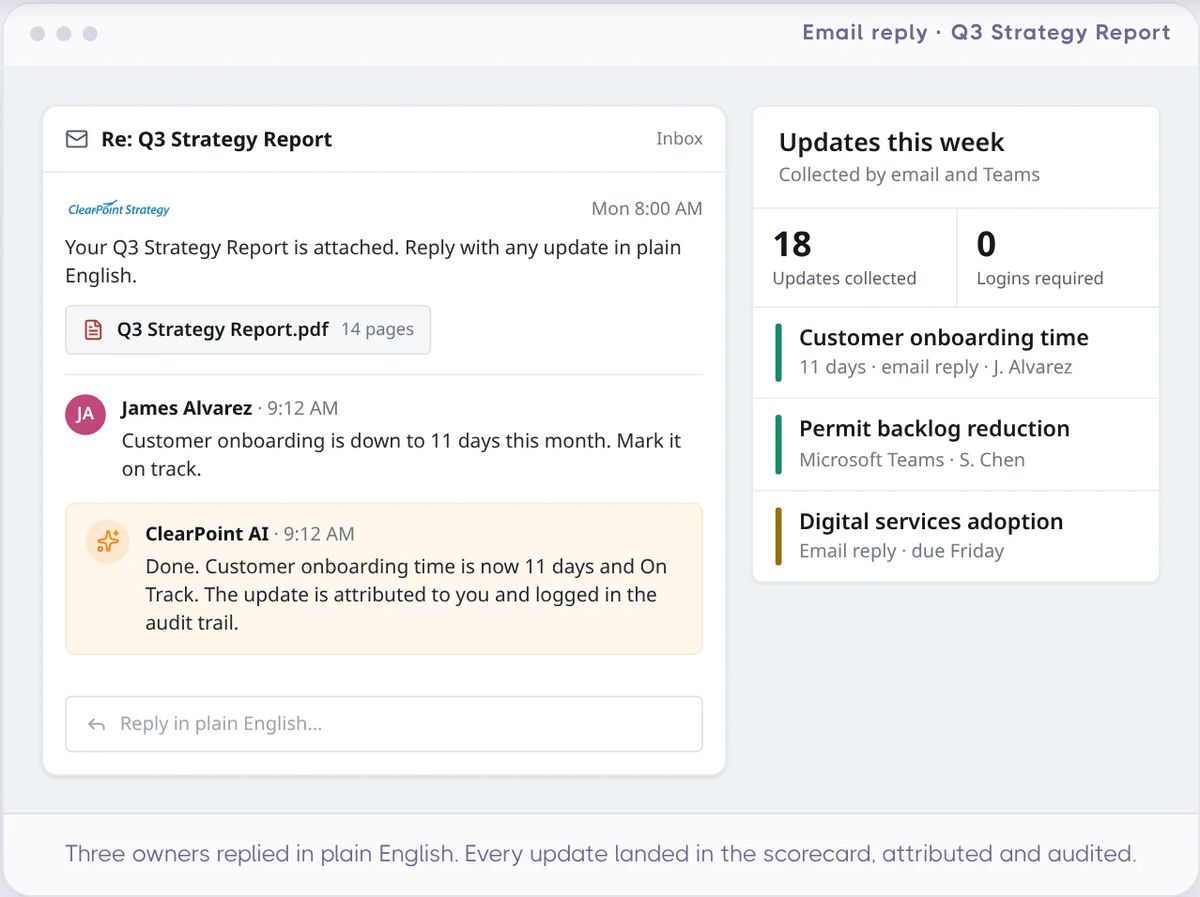
- Let owners update where they already work. An owner can reply in plain English to a ClearPoint email that carries a PDF report; ClearPoint AI writes the update back into the scorecard, attributed. ClearBot in Microsoft Teams works the same way. Neither needs a login.
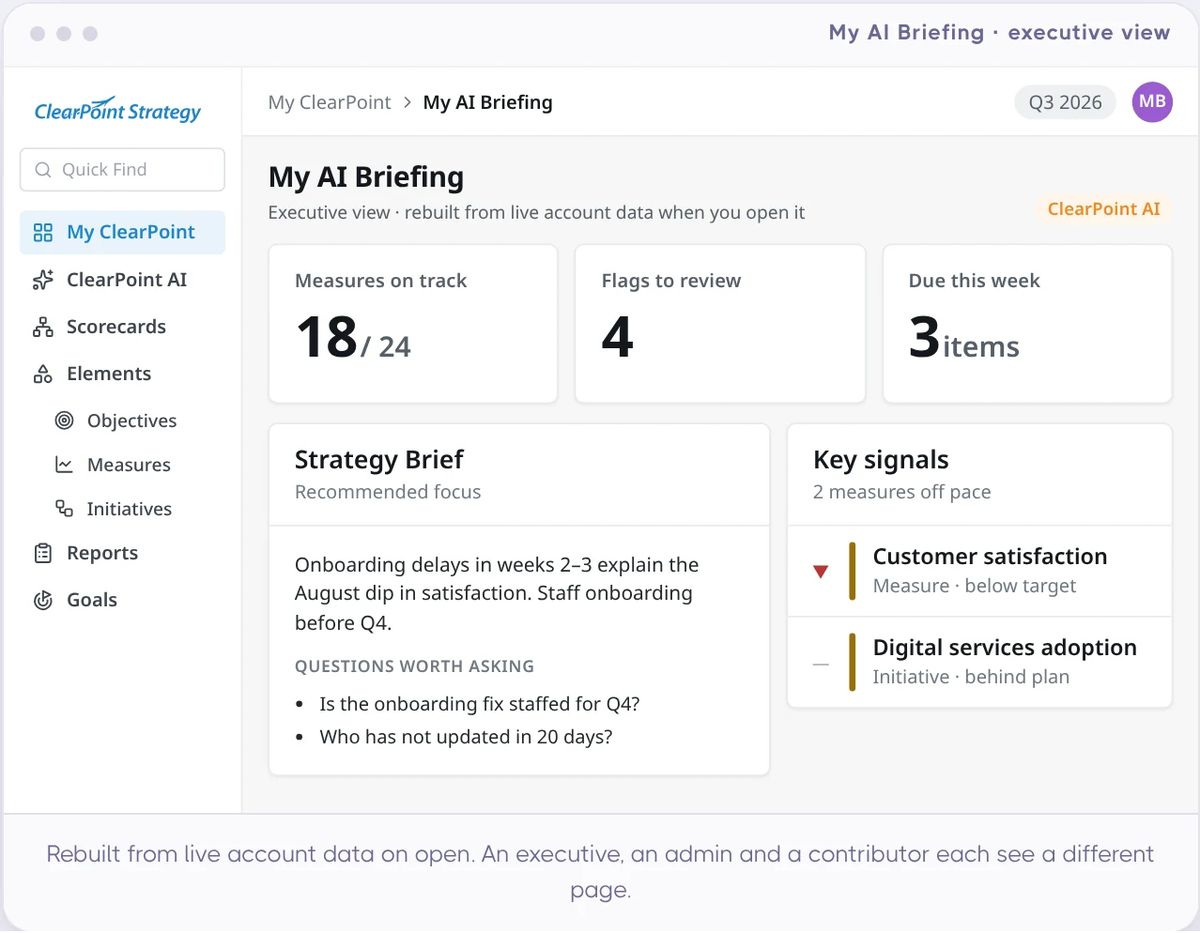
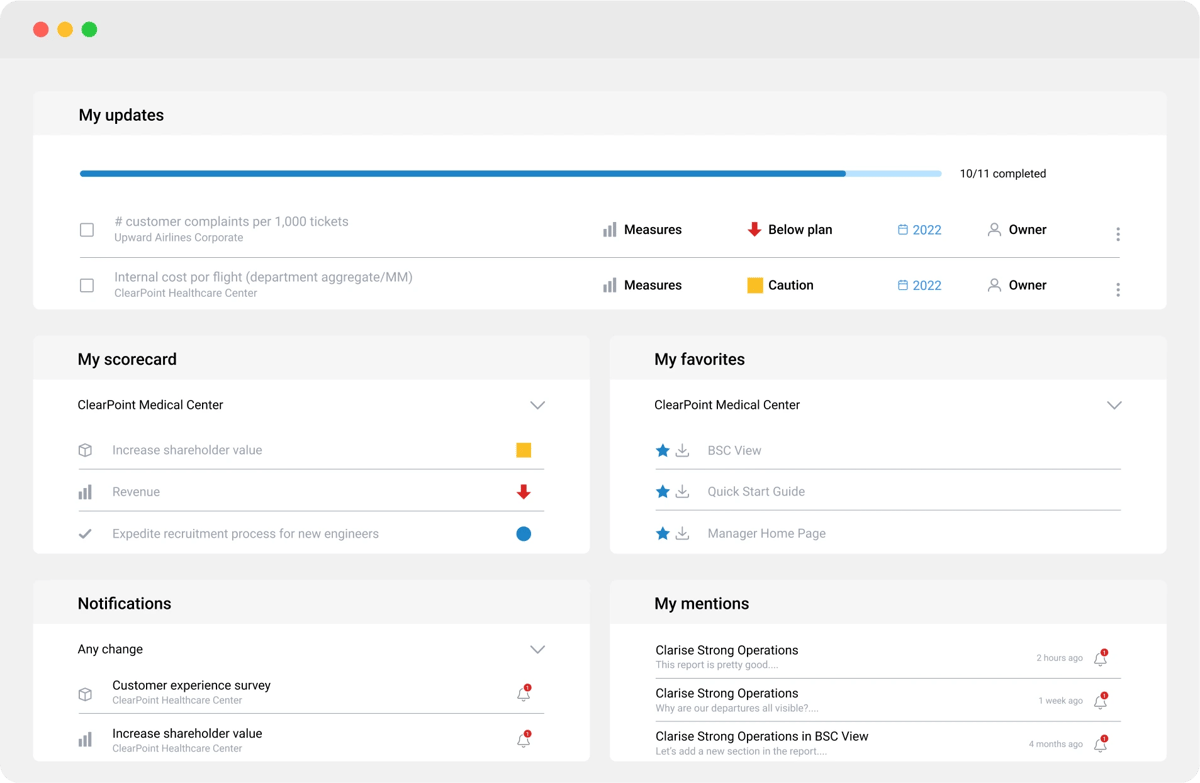
- Make missing updates visible. Filter any report by owner, and each owner’s My Scorecard page lists everything they own across scorecards, with status and reporting period. That way the review meeting can open with the list of owners who have not reported.

Plan size and initiative completion
Share of initiatives marked complete, by plan structure (a plan = one ClearPoint scorecard)
Source: ClearPoint anonymized platform data, plans run on the platform 2017–2024: 4,184 plans with at least one objective and one initiative. We see the structure of plans, never their content.
Plans with 21 or more objectives complete 9.1% of their initiatives, against 11.8% for plans with 1 to 10 (11.1% for 11 to 20). Plans with 4 to 8 measures per objective complete 15.1% of their initiatives, against 10.1% for plans with 3 or fewer. Trim the objective list while it is still a spreadsheet, before migration.
Moving a city plan off spreadsheets? Our spreadsheet-to-software migration guide for cities walks through the cutover.
Which strategic planning software is easiest for department heads to update every month?
The one that asks the least of the person updating. G2 reviews of every platform here comment on ease of use; read them for what the monthly updater goes through. ClearPoint’s G2 review summary notes that training and complex administration can take extra effort, and that effort falls mostly on the administrator who configures plans and reports.
For the person who updates once a month, ClearPoint takes a different route: they don’t need to learn the app.
- Reply to the report email. Plain English, no login; the update lands in the scorecard, attributed.
- Or ask in Microsoft Teams. ClearBot takes the same update from Teams.
- See only your own work. When they do log in, My Scorecard shows only the elements they own or collaborate on, with status and reporting period.
- Start from last month’s entry. Copy forward carries the fields they choose from the previous period into the new one.
How to test any vendor: in the demo, give a department head who has never seen the tool one measure to update for the month, with no training. Time it. Then ask the vendor what leadership sees if that person ignores the request.
What should government buyers check before the RFP?
Public-sector purchases fail differently: the demo impresses the committee, then procurement, security review and year-two adoption decide the outcome. If you are buying performance management software for local government, four checks separate the finalists:
- Report automation is the job. In the demo, build your actual council packet and time it.
- Security documentation. SOC 2 Type II attestation, SAML single sign-on, two-factor authentication, encryption at rest and in transit. Ask every finalist for the audit report itself.
- Services decide year two. Ask who, by name, is accountable for your success after go-live, and what happens when your plan administrator takes another job.
- Test for ownership. Assign an owner in the demo and ask what leadership sees when someone skips two update cycles.
Where plans actually stall: ownership
Across 52,247 objectives in 318 organizations, 77% have no named owner. In local governments alone, 75.6% do. And initiatives with a named owner are completed 2.5× as often (21.5% vs 8.7%).
Plan size matters too. Plans with 21 or more objectives complete 9.1% of their initiatives, against 11.8% for plans with 1 to 10. Plans with 4 to 8 measures per objective complete 15.1% of their initiatives, against 10.1% for plans with 3 or fewer. Whatever platform you pick, check that it shows you who owns what, and who hasn’t updated.
Source: ClearPoint anonymized platform data, plans run on the platform 2017–2024. Objectives: 52,247 in 318 organizations. Initiatives: 90,305 in 315 organizations. Plan structure: 4,184 plans with at least one objective and one initiative. We see the structure of plans, never their content.
Whatever you shortlist, the demo question is the same: can it show, in one filter, which objectives and projects have no owner and who has not updated this period?
For the full evaluation matrix, see our strategic planning software RFP guide for local government. For a city-by-city view of the same market, see our comparison of planning and performance software for cities and counties.
What features should strategic planning software have?
The feature lists in this category look alike. These are the ones that decide whether a plan survives its first year:
- Framework flexibility: Balanced Scorecard, OKRs, Baldrige or simple goal-based plans, without forcing one method.
- Ownership and reminders: a named owner on every objective, measure and initiative, with scheduled update requests.
- Automated reporting: board books, council packets and dashboards built from live data rather than copy-paste.
- Alignment views: department plans linked to organization goals, so gaps are visible.
- Data integrations: imports from the spreadsheets and systems where your measures already live.
- Quantitative and qualitative updates: numbers plus the analysis that explains them.
- AI assistance: drafting summaries and spotting stale updates, on data that is never used to train AI models.
- Security and services: SOC 2 Type II, single sign-on, and a named person accountable after go-live.
Strategic planning is the method; for the steps behind it, start with our complete guide to strategic planning. If you mainly need to choose a tool for executing an existing strategy, our strategy execution software comparison covers that question.
Why ClearPoint, if your plan reports to a board or council
ClearPoint was founded in 2008 by Ted Jackson and Dylan Miyake, who worked with Robert Kaplan and David Norton — the creators of the Balanced Scorecard — and have worked in strategy execution since 1999. We analyzed over 20,000 strategic plans run on ClearPoint between 2017 and 2024, and the lesson is the one in the box above: the plans that stall are the ones where objectives have no owner and the report is assembled by hand every cycle. ClearPoint is built for that part. Set up with you, live in 3 weeks.
Common questions
What is the best strategic planning software in 2026?
It depends on who you report to. For organizations that report a plan to a board or council, ClearPoint Strategy (4.6 on G2, 180 reviews) is the only platform in our comparison that combines 100+ G2 reviews at 4.5 or more, a stated focus on government, healthcare and higher education, and a SOC 2 Type II report stated on its public site. Cascade (4.8, 260) and WorkBoard, which now includes Quantive (4.6, 308), lead for corporate strategy teams. G2 figures read on November 16, 2026.
What is the best strategic planning software for local government?
Four platforms in this comparison name local government as a focus: ClearPoint Strategy, AchieveIt, Envisio and OpenGov. ClearPoint fits when council reporting and named services are the job; 120+ local governments have run their plans on it. Envisio fits public-facing dashboards, AchieveIt rolls up many plans, and OpenGov fits when the budget book is the main project. Test each against your actual council packet.
How much does strategic planning software cost?
Most vendors don't publish a price. Of the ten platforms we compared on November 16, 2026, only OnStrategy lists one ($200 a month for its self-guided plan); the other nine quote after a conversation, based on users, plans and services. Ask finalists for first-year and year-two cost in writing, implementation and support included. ClearPoint prices by quote after a short call.
Is Quantive still available as a standalone product?
Quantive was acquired by WorkBoard in May 2025, and Quantive customers are moving onto the WorkBoard platform. On G2, the Quantive StrategyAI listing now shows no reviews, while WorkBoard holds 4.6 across 308 (November 16, 2026). Confirm roadmap, migration timing and contract terms before renewing; our Quantive migration guide covers the options.
What should a strategic planning software RFP include?
Four sections do the heavy lifting: required reporting outputs (council packets, board books, public dashboards), security requirements (SOC 2 Type II audit report, single sign-on, encryption), named services and support after go-live, and an ownership test: how the platform assigns owners and shows missed updates. Our local government RFP guide includes a full template.
Does strategic planning software actually improve outcomes?
Software helps when it keeps ownership and review alive. In ClearPoint anonymized platform data on plans run 2017–2024, initiatives with a named owner are completed 2.5× as often as those without (21.5% vs 8.7%, 90,305 initiatives in 315 organizations). That is a correlation, not proof of cause, so judge any platform on how it surfaces owners and missed updates.
Where does ClearPoint's strategic planning data come from?
From ClearPoint anonymized platform data: we analyzed over 20,000 strategic plans run on ClearPoint between 2017 and 2024. Objectives: 52,247 in 318 organizations. Initiatives: 90,305 in 315 organizations. Plan structure: 4,184 plans with at least one objective and one initiative. We see the structure of plans, never their content. How we read the data.
Can Excel, SharePoint or PowerPoint replace strategic planning software?
For one team with one plan, yes, until recurring reporting across departments breaks it. Excel and SharePoint store a plan well; they do not request updates on a schedule, show who has not reported, or build the board report. For scale, the median city or county on ClearPoint runs 28 plans, 522 measures and 191 initiatives (September 2026). Across 52,247 objectives in 318 organizations, 77% have no named owner, in ClearPoint anonymized platform data on plans run 2017–2024. Software can name the owner and ask for the update; a spreadsheet can't.
Which strategic planning software has a free trial?
Of the ten platforms we compared on November 16, 2026, three state a free option on their own site: Cascade (a free plan for two users), OnStrategy (a free trial) and Intrafocus (a 30-day trial on request). Planview lists demos and free trials; ask which apply. ClearPoint, WorkBoard, AchieveIt, Envisio, OpenGov and Rhythm Systems start with a demo, a guided tour or an assessment.
How do we assign owners and get status updates without chasing people?
Name one person, not a department, as owner of each objective, measure and project, cut the plan to a critical few, then put update requests on a schedule so the platform asks instead of a person. In ClearPoint, reporting workflows send each owner the request and a checklist of what needs their update. Owners can reply in plain English to the ClearPoint report email, or ask ClearBot in Microsoft Teams, and the update is written back to the scorecard, attributed. Leaders filter reports by owner to see who has not reported.
Which strategic planning software is easiest for department heads to update every month?
Look at what the monthly updater has to do, not the administrator. ClearPoint's G2 review summary notes that training and complex administration can take extra effort; that effort falls mostly on the administrator who configures plans and reports. For the department head, ClearPoint takes the app out of the monthly update: they reply to the report email in plain English or use ClearBot in Microsoft Teams, and the update lands in the scorecard, attributed. Test any vendor the same way: give a department head one measure to update with no training, and time it.
Why do strategic plans stall after the software is bought?
Mainly because of ownership. Across 52,247 objectives in 318 organizations, 77% have no named owner, and initiatives with a named owner are completed 2.5× as often (21.5% vs 8.7%). Large plans also finish less: plans with 21 or more objectives complete 9.1% of their initiatives, against 11.8% for plans with 1 to 10 (ClearPoint anonymized platform data, plans run 2017–2024).
What is strategic planning software?
Strategic planning software holds an organization’s plan (goals, objectives, measures and projects) in one place, assigns an owner to each piece, collects updates on a schedule and turns them into reports for leaders, boards or councils.